
ShakTechnology Pty Ltd
  • 0 Shopping Cart
  • Home
  • Store
    • Browse All
    • Bare-Bone Hosting
    • Starter Hosting
    • Business Hosting
    • Premium Hosting
    • Elite Hosting
    • 2 Page EasyWeb Solution
    • 4 Page EasyWeb Solution
    • 8 Page EasyWeb Solution
    • Web Design
    • Web Support
    • SSL Certificates
    • Website Security Updates
    • Website Care Packages
    • Setup Social Media Platform
    • Email Spam Filtering
    • Professional Email
    • Register a New Domain
    • Transfer Domains to Us
  • Announcements
  • Knowledgebase
  • Network Status
  • Contact Us
  • More
  • Account
    • Login
    • Forgot Password?
  1. Portal Home
  2. Knowledgebase
  3. Wordpress
  4. How to remove your post in Wordpress?

  Categories

4
Backup/Restore
14
Client Area
28
cPanel - Control Panel
14
Databases
11
Databases
54
Domains
53
Email
5
Files
22
FTP
4
Hosting Record How-to
0
Installing a Control Panel
8
Intro to Web Hosting
1
JEvents
18
Joomla
1
Logs
3
Others
13
phpMyAdmin
14
Security
60
SiteWorx (Control Panel)
15
Softaculous
60
Softaculous
0
SolusVM
1
SSL Certificates
0
Terms of Service
17
Transferring Your Domain
6
TroubleShooting
3
Using my Browser
1
Virtual Desktop Sharing
1
Web Hosting Glossary
1
WebMatix
1
Where do I go ?
23
Wordpress

  Categories

  Tag Cloud

Contacts cPanel firewall Gmail sub-accounts whm

  Support

  My Support Tickets   Announcements   Knowledgebase   Downloads   Network Status   Open Ticket

How to remove your post in Wordpress? Print

  • 0

You can remove your published or draft post in Wordpress.


1. Login to your WordPress admin dashboard.
2. Under the dashboard menu, hover your mouse on Posts and then click on "All Posts".
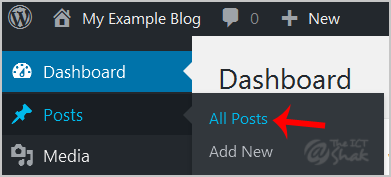


3. Choose the post you wish to remove and the "Trash" option will appear, Click on it.
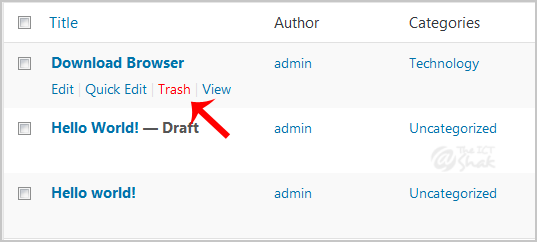

You will get a success message like "1 post moved to the Trash".


Was this answer helpful?

Related Articles

How to Change Your Header in WordPress This tutorial will teach you how to change your header in WordPress. You will need to be logged... How to Install WordPress The purpose of this tutorial it to teach you how to install WordPress directly from... How to Configure Your Settings in WordPress This tutorial will teach you how to configure your settings in WordPress. You should log in, and... How to remove multiple posts with a single click in WordPress? It is possible to remove multiple post in your WordPress dashboard. You can also remove selected... How to add a new category in WordPress? 1. Login to your WordPress admin dashboard.2. Under the dashboard menu, hover your mouse on Posts...
« Back

  Tag Cloud

Contacts cPanel firewall Gmail sub-accounts whm

  Support

  My Support Tickets   Announcements   Knowledgebase   Downloads   Network Status   Open Ticket
  • Contact Us
  • Terms of Service

Copyright © 2026 ShakTechnology Pty Ltd. All Rights Reserved.


Loading...
Loading...

Generate Password

Please enter a number between 8 and 64 for the password length